Power Designing
PowerDesigner
Issues with ExecuteCustomMethod
So now that I’ve extolled the virtues of ExecuteCustomMethod, it’s time for me to gripe. Turns out ExecuteCustomMethod is only available for sub-classes of ExtensibleObject. Those aren’t the only classes that can have a custom method, it’s just that classes that aren’t derived from extensible method can’t have their custom methods executed from another object or script.
Now, most of the objects you work with on a regular basis are going to support execute custom method (most of the stuff you’d put on a diagram is covered), but the diagram itself isn’t, which is where I got caught. So, if you follow my advice and start using ExecuteCustomMethod be aware of those classes that can’t expose a custom method before you write a bunch of code that won’t work.
I’ve sliced the classes that WON’T work from the help file in case you’re interested.
-
- IdentifiedObject
    +-ShortcutBase
    +-TargetModel
    +-BaseReplication
    +-BaseDiagram
    |   \-PackageDiagram
    |       +-BaseDialogView
    |       |   +-BaseExtensibleDialogView
    |       |   |   \-DependencyMatrix
    |       |   +-RequirementsDocumentView
    |       |   +-TraceabilityMatrixView
    |       |   \-UserAllocationMatrixView
    |       +-BusinessProcessDiagram
    |       +-ProcessHierarchyDiagram
    |       +-ProcessServiceDiagram
    |       +-BaseLogicalConceptualDiagram
    |       |   +-ConceptualDiagram
    |       |   \-LogicalDiagram
    |       +-InformationLiquidityDiagram
    |       +-TransformationDiagram
    |       +-TransformationControlFlowDiagram
    |       +-FreeDiagram
    |       +-ProjectDiagram
    |       +-FrameworkMatrixDiagram
    |       +-EnterpriseArchitectureDiagram
    |       |   +-ApplicationArchitectureDiagram
    |       |   +-CityPlanningDiagram
    |       |   +-OrganizationChartDiagram
    |       |   +-TechnologyInfrastructureDiagram
    |       |   +-ProcessMapDiagram
    |       |   +-BusinessCommunicationDiagram
    |       |   \-ServiceOrientedDiagram
    |       +-ImpactAnalysisDiagram
    |       +-MeriseTreatmentDiagram
    |       |   +-FlowDiagram
    |       |   +-ConceptualDiagram
    |       |   \-OrganizationalDiagram
    |       +-BaseUMLDiagram
    |       |   +-ClassDiagram
    |       |   +-UMLPackageDiagram
    |       |   +-UseCaseDiagram
    |       |   +-SequenceDiagram
    |       |   +-ComponentDiagram
    |       |   +-ActivityDiagram
    |       |   +-StatechartDiagram
    |       |   +-DeploymentDiagram
    |       |   +-CommunicationDiagram
    |       |   +-InteractionOverviewDiagram
    |       |   +-ObjectDiagram
    |       |   \-CompositeDiagram
    |       +-PhysicalDiagram
    |       +-MultidimensionalDiagram
    |       \-XMLDiagram
    +-ReportBaseClass
    |   \-ReportParagraphContainer
    |       \-BaseReport
    |           \-BaseModelReport
    |               +-IntraModelReport
    |               \-MultiModelReport
    |   +-BaseLinkObject
    |   |   +-ExtendedDependency
    |   |   +-ConditionalLink
    |   |   |   +-MessageFlow
    |   |   |   |   +-Flow
    |   |   |   |   \-ResourceFlow
    |   |   |   +-ControlFlow
    |   |   |   \-FlowLink
    |   |   |       +-Transition
    |   |   |       \-ActivityFlow
    |   |   +-ReferenceJoin
    |   |   +-ViewReferenceJoin
    |   |   +-CubeDimensionAssociation
    |   |   +-BaseLogicalInheritanceLink
    |   |   |   +-InheritanceLink
    |   |   |   \-InheritanceLink
    |   |   +-AssociationLink
    |   |   +-RelationshipJoin
    |   |   +-DependencyLink
    |   |   +-BaseOperationTriggering
    |   |   |   +-OperationTriggering
    |   |   |   \-PhaseTriggering
    |   |   +-EventEmission
    |   |   |   +-OperationEmission
    |   |   |   \-PhaseEmission
    |   |   +-InnerLink
    |   |   +-InstanceLink
    |   |   \-AssociationClassLink
    |   +-CompositionLink
    |   |   +-Permission
    |   |   +-FaultMessage
    |   |   +-DataAccess
    |   |   +-BaseDataMapping
    |   |   |   +-EmissionDataMapping
    |   |   |   \-ReceptionDataMapping
    |   |   +-RoleAssociation
    |   |   \-TraceabilityLink
    |   +-BaseStructuralFeatureMapping
    |   |   +-DefaultStructuralFeatureMapping
    |   |   +-ExternalColumnMapping
    |   |   +-StructuralFeatureMapping
    |   |   |   +-ColumnMapping
    |   |   |   +-AttributeMapping
    |   |   |   \-MeasureMapping
    |   |   +-BaseAttributeMapping
    |   |   |   +-EntityAttributeMapping
    |   |   |   +-AssociationAttributeMapping
    |   |   |   \-InheritanceAttributeMapping
    |   |   +-ExternalBaseAttributeMapping
    |   |   |   +-ExternalEntityAttributeMapping
    |   |   |   +-ExternalAssociationAttributeMapping
    |   |   |   \-ExternalInheritanceAttributeMapping
    |   |   +-ClassAttributeMapping
    |   |   +-AttributeMapping
    |   |   +-ColumnMapping
    |   |   +-AttributeMapping
    |   |   +-TableColumnMapping
    |   |   +-ClassAttributeMapping
    |   |   \-ExternalAttributeMapping
    |   +-BaseMappingBehavioralFeatureMapping
    |   |   +-DefaultBehavioralFeatureMapping
    |   |   \-OperationMapping
    |   +-Artifact
    |   +-ListReportResultSet
    |   +-BaseImpactAnalysisObject
    |   |   \-ImpactAnalysisObject
    |   +-IndexColumn
    |   +-EventScript
    |   +-ImpactAnalysisCategory
    |   +-DataAccess
    |   +-Annotation
    |   +-BaseInteractionFragment
    |   |   +-InteractionReference
    |   |   \-InteractionFragment
    |   +-InteractionActivity
    |   +-UserAllocation
    |   \-Component
    |       +-AnnotatedComponent
    |       |   +-AnyAttribute
    |       |   +-AttributeBase
    |       |   |   +-Attribute
    |       |   |   \-AttributeGroup
    |       |   +-Content
    |       |   |   +-ComplexContent
    |       |   |   \-SimpleContent
    |       |   +-Derivation
    |       |   |   +-Extension
    |       |   |   +-Restriction
    |       |   |   +-SimpleTypeList
    |       |   |   \-SimpleTypeUnion
    |       |   +-External
    |       |   |   +-Import
    |       |   |   +-Include
    |       |   |   \-Redefine
    |       |   +-Facet
    |       |   |   +-EnumerationFacet
    |       |   |   +-MaxExclusiveFacet
    |       |   |   +-MaxInclusiveFacet
    |       |   |   +-MinExclusiveFacet
    |       |   |   +-MinInclusiveFacet
    |       |   |   +-NumericFacet
    |       |   |   |   +-FractionDigitsFacet
    |       |   |   |   +-LengthFacet
    |       |   |   |   +-MaxLengthFacet
    |       |   |   |   +-MinLengthFacet
    |       |   |   |   \-TotalDigitFacet
    |       |   |   +-PatternFacet
    |       |   |   \-WhitespaceFacet
    |       |   +-Field
    |       |   +-IdentityConstraint
    |       |   |   +-Key
    |       |   |   +-KeyRef
    |       |   |   \-Unique
    |       |   +-Notation
    |       |   +-Particle
    |       |   |   +-Group
    |       |   |   +-Any
    |       |   |   +-Element
    |       |   |   \-GroupParticle
    |       |   +-Selector
    |       |   \-Type
    |       |       +-ComplexType
    |       |       \-SimpleType
    |       +-Annotation
    |       \-AnnotationItem
    |           +-AppInfo
    |           \-Documentation
    +-ExtendedBaseCollection
    |   +-ExtendedCollection
    |   \-ExtendedComposition
    +-GenerationTargetDefinition
    |   +-ReportLanguage
    |   +-ExtendedModelDefinition
    |   +-UserProfile
    |   +-DBMS
    |   +-ProcessLanguage
    |   +-AnalysisRule
    |   +-ObjectLanguage
    |   \-SchemaLanguage
    +-ObjectSelection
    +-PersistentSelectionManager
    +-PersistentSelection
    +-BaseTransformation
    |   +-MDATransformation
    |   \-Transformation
    |       +-Partitioning
    |       |   +-HorizontalPartitioning
    |       |   \-VerticalPartitioning
    |       \-TableCollapsing
    +-TransformationSource
    +-TransformationTarget
    |   +-TargetTable
    |   \-Partition
    +-XmlNamespaceBase
    |   +-Namespace
    |   +-XmlNamespace
    |   \-XmlNamespace
    +-ArtifactFolder
    +-Settings
    +-BaseAttribute
    |   +-InheritanceAttribute
    |   +-AssociationAttribute
    |   \-EntityAttribute
    +-DataStructureSortedColumn
    +-DataStructureJoin
    +-ImpactAnalysisImpactedModel
    +-AttributeValue
    +-TypeParameterValue
    \-FlowMappingParameter
Use ExecuteCustomMethod for Better Code
I’m in the process of upgrading some of my xem files and one of the things I’m doing a lot of is using ExecuteCustomMethod to simplify both my global script library and a lot of my code. Many of the functions I write end up being accessible in the context menu both for the base object (e.g. Table), a package, and the model. In the past, I’ve either wrapped the common bits of code into the global tab or I’ve duplicated it into methods at the various levels.
Both of these approaches have problems. Putting everything in the global script tab leaves me with an enormous stack of code to go through when I’m making changes. On several occasions, I’ve managed to break a unit I wasn’t intending to change at all with a fat finger while doing my editing. It also separates the code from the object it’s working on, which for a complex XEM file makes maintenance a bit more difficult.
Copying the method code from the base object, to the package and model methods is easier. It keeps the volume of code in my global script tab more manageable and makes seeing what the method at each level is doing easier, but it leads to the inevitable slips where I update some copies but not all of them. Plus, as a former programmer, it’s hard to do without feeling guilty.
The solution (in case you didn’t read the post name) is ExecuteCustomMethod. It allows me to avoid the problems (and guilt) associated global methods and code duplication. I write my methods for an object, and then re-use them elsewhere by calling ExecuteCustomMethod.
If I want to put a method on a table DoSomething, I can call that method elsewhere with:
Table.ExecuteCustomMethod("<XEM Name>.DoSomething")
Now I have all my code associated with tables in one place, and I can call them from anywhere without duplication. There are a few issues. I can’t return a value and I can’t pass parameters. There’s an easy solution to this problem. If I have to pass a parameter or get a a value back, I can always use a global (a model level ExtendedAttribute). This sounds like a bad idea, but for the types of things I would normally control with a parameter, and extended attribute may be a better idea anyway, since I can use it to store user preferences between executions. Return values are a little more problematic, but you’ve gotta do what you’ve gotta do.
Now I have most of my custom code associated with the object it acts on and my global script tab is reserved for functions or subroutines which need to return a value or aren’t object specific (my output function for example).
Best of luck, and I hope ExecuteCustomMethod saves you some time or trouble in the future too.
Missing Timestamps and AltEnableTSCopy
I’m working on a deploy for an Oracle (10g) database and I’ve been asked to preserve data. Because most of my tables are compressed I’ve got “use alter when possible” disabled (that and the fact that you rarely get alters anyway but that probably deserves its own post someday). So, PowerDesigner does this:
- Rename the original table to “tmp_Table”
- Create the new table
- Insert into table (col1, …, colN) select col1, …, colN from “tmp_Table”
When I test the script, I discover that my audit columns (“Created Datetime”, “Last Update Datetime”) are missing from my insert statements. No errors reported. No warnings. No question marks for me to find and fix. They’re just not there. This seemed a bit unusual.
Turns out there’s an option in the XDB file that allows you to skip timestamp columns when you reload the table. Probably handy, but not what I want. More interesting, the default is set to omit them. Even more interesting, the option is hidden when you look in the XDB file. I’m assuming the thinking is that timestamp columns will be populated with defaults (or by trigger) when the data is re-inserted but, in this case, I don’t want my table alterations to change the audit trail information in the table and it seems a bold assumption that all of your timestamp columns are audit trail data anyway.
To change the value, you need to go to Edit Database\Script\Objects\Column then right click on table and select “Add Items”.
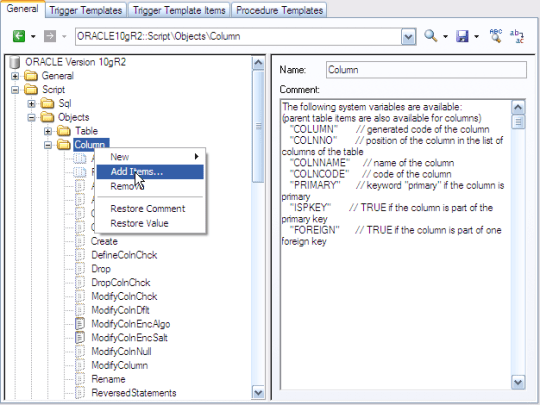
Scroll through the list of options that we apparently don’t need to know about and find AltEnableTSCopy.

Add it to the list of options, and then change the default from 0 (skip timestamp columns) to 1 (copy timestamp columns). You should now see your timestamp columns included in your insert statements.
I think this behavior is really poorly thought out.
- The default should be to include all columns in the insert statement rather than omitting them
- If you’re going to have the default be to omit columns from an insert statement, the parameter to configure this should really be visible without having to go in and manually add it.
I did take a few minutes to peak at the rest of the hidden options in the column and table objects in the XDB file and some of them appear quite useful. I hope to complete a more thorough review in the future. If I find anything interesting, I hope to post it here.
 Power Designing