Power Designing
Rich Kier
Selection Goodness
Today’s post is on selections. Selections are a great way to script changes to multiple objects and a great way to make your custom methods more flexible.
Selections are just what they sound like, a group of objects, placed into a collection for processing. Let’s jump right in with a simple example:
Dim mySel
Set mySel = ActiveModel.CreateSelection
mySel.AddObjects ActiveModel, cls_table, false, true
The first two lines declare and create your selection. The third line adds all objects of the given class, in this case tables, to the selection. The last two parameters (false, true) tell the script to skip shortcuts and to recurse through sub-packages. Now that we have our selection, how do we use it. The following lines will loop through the collection. For my examples, I’m using SetNameAndCode to rebuild the codes on all the objects in the selection, just to demonstrate the concept.
Dim myObj
Dim mySel
Set mySel = ActiveModel.CreateSelection
mySel.AddObjects ActiveModel, cls_table, false, true
For each myObj in mySel.Objects
 With myObj
 Output .Name
 .SetNameAndCode .Name, "", True
 end with
Next
So far, so good. It gets better though. You’re not restricted to a single class in a selection. So if you’d like to rebuild the codes for both tables and views, you can add both classes. Our revised code looks like:
Dim mySel
Dim myObj
Set mySel = ActiveModel.CreateSelection
mySel.AddObjects ActiveModel, cls_table, false, true
mySel.AddObjects ActiveModel, cls_view, false, true
For each myObj in mySel.Objects
 With myObj
 Output .Name
 .SetNameAndCode .Name, "", True
 end with
Next
Without a selection, we’d be stuck doing something like:
For each tab in ActiveModel.tables
 Output tab.Name
 Tab.SetNameAndCode Tab.Name, "", True
Next
For each view in ActiveModel.views
 output view.name
 view.SetNameAndCode view.Name, "", True
Next
That’s not too bad, but notice our SetNameAndCode sample is very short. Also, we’re only dealing with two classes and we’re only dealing with objects in the root of the model. If we want to recurse through packages, there’s a lot of additional work yet to be done.
Now, suppose we don’t want to include all objects of a particular class, but we’d like to be a bit more choosey. We have a couple of options:
- AddActiveSelectionObjects
- ShowObjMultiSelection
- ShowObjectPicker
The first, AddActiveSelectionObjects method, does exactly what it says it does. Whatever objects you currently have selected, either in the browser or the active diagram are added to your current selection. I’ll focus on the other two.
The second two provide dialog boxes which you can use to define your selection manually.
Here’s an example:
Dim mySel
Set mySel = ActiveModel.CreateSelection
mySel.ShowObjMultiSelection ActiveModel, "Tables"
The first parameter is the name of the parent object. In this case, the active model. The second parameter, this case “Tables” is the name of the collection you want to select from. You’ll get a dialog that looks like this:
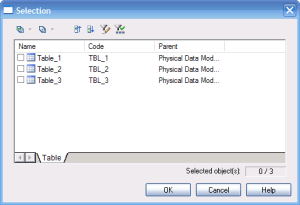
Choose the objects you want and processing using the same select loop. Instead of the active model, the first parameter can be changed a particular table, view, etc. This allows you to choose from objects that apply only to that object. This is very handy in a custom method. For example, this method would allow you to select references on a particular table. Keep in mind that the selection itself is still a property of the model, not Obj.
Sub %Method%(obj)
   dim mySel
   dim myObj
   Set mySel = ActiveModel.CreateSelection
   mySel.ShowObjMultiSelection Obj, "InReferences"
   for each myObj in mySel.Objects
      With myObj
         Output .Name
         .SetNameAndCode .Name, "", True
      end with
   next
End Sub
If you’ve looked at the VBScript help file, you probably know there’s a great example of how to build your own custom selection list for the multi-selection method. I’m going to change it just a bit to show you how to get a single selection dialog with both inReferences and outReferences. This also demonstrates the Add method available to any collection.
Sub %Method%(obj)
   dim myObj
   dim ref'add all of the objects we’re interested in to the collection
   Set mySel = ActiveModel.CreateSelection
   For each ref in Obj.inReferences
      mySel.Objects.Add(ref)
   next
   For each ref in Obj.outReferences
      mySel.Objects.Add(ref)
   next
   'now show the objects in the selection in your dialog
   mySel.ShowObjMultiSelection mySel, "Objects"
   for each myObj in mySel.Objects
      With myObj
         Output .Name
         .SetNameAndCode .Name, "", True
      end with
   next
End
The other method of adding objects to a selection, SubShowObjectPicker, behaves quite a bit differently. I don’t use this method nearly as often, but we’ll cover it just for completeness.
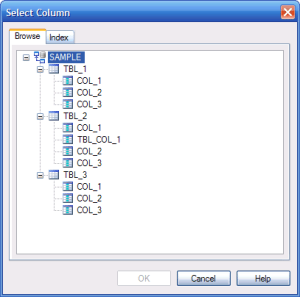
Unlike the mult-selection dialog, ShowObjectPicker always (as far as I can tell) starts from the active model. You can choose which class of object the user gets to choose from (e.g. tables or columns) but you can’t choose to show only columns belonging to a specific table. You can filter by stereotype but unless you’re going to change the stereotype for an object at runtime (and set it back when you’re done), this isn’t an approach I find particularly useful. Anyway, here’s a code snippet and the result.
Dim mySel
Set mySel = ActiveModel.CreateSelection
mySel.ShowObjectPicker "Table:Column"
This gives you the following dialog:
 Well, that’s enough for now. More to come.
New Feature Request: Persist Model Checks
I’ve been a bit distracted from my scripting work, but I thought it might be fun to post some thoughts on new features I’d like to see in the tool.
The new feature I’d like to see (today) is an improvement to the check model functionality. I once managed a group of modelers (apparently not my strong point) and now I still perform model reviews and work on internal process improvements for our modelers. I love the check model functionality, and I’ve tried to write as many custom checks as possible to enforce our standards and best practices. I have a few problems with it though.
- You can’t mark a warning as reviewed
- The results of a check model aren’t stored anywhere.
I want people to run a check model FREQUENTLY and review the results thoroughly. Unfortunately, for a large model, the number of warnings can grow quite large. In our environment, we support a large number of models which originated long before our current standards and best practices. We update portions of them as we do ongoing maintenance, but we rarely have the opportunity to go through an entire model and apply standards just for the sake of applying standards. If we don’t have a reason to touch the code operating on a section of a model, it remains “as-is” until we do. On a large model that can mean getting hundreds of warnings that are “expected” and won’t be addressed, along with a few important ones that need to be looked at (and usually a few errors too). The warnings that occur every time, and for whatever reason we’ve decided are acceptable, make it easier to miss the errors we are interested in. Usually the modelers end up ignoring those warnings, or turning that specific check off. Neither is a very good option.
Now suppose when we inherit our model we run a check, review the results and either fix the existing warnings, or mark them as “reviewed”. The check dialog shows them with a new symbol and perhaps allows you to enter a comment such as “table pre-dates current standards”. That error stays “reviewed” until the underlying object is modified. Then they go back to warnings, which can be addressed, or marked as reviewed again. Now the modelers can leave the check on and focus on the warnings that apply to the portions of the model they’ve modified.
In order for this to be useful, the results of checks must be stored in the model. If they’re in the model, they’re in the repository. Now if I put my manager hat back on, I can find out which models have been properly reviewed and which haven’t. I can see whose models are being reviewed, and who is performing it. Useful information at review time. I can also find out which checks are most commonly being triggered and which are being reviewed and ignored. A review that is being marked as reviewed 90% of the time may need to be refined to reduce false positives (or we may need more training for the team to ensure they understand what the check is supposed to be doing). Knowledge is power, and with this information, we have the opportunity to improve our model checks and then our models.
If you’re reading this (bored?), what new features would you like to see?
Issues with ExecuteCustomMethod
So now that I’ve extolled the virtues of ExecuteCustomMethod, it’s time for me to gripe. Turns out ExecuteCustomMethod is only available for sub-classes of ExtensibleObject. Those aren’t the only classes that can have a custom method, it’s just that classes that aren’t derived from extensible method can’t have their custom methods executed from another object or script.
Now, most of the objects you work with on a regular basis are going to support execute custom method (most of the stuff you’d put on a diagram is covered), but the diagram itself isn’t, which is where I got caught. So, if you follow my advice and start using ExecuteCustomMethod be aware of those classes that can’t expose a custom method before you write a bunch of code that won’t work.
I’ve sliced the classes that WON’T work from the help file in case you’re interested.
-
- IdentifiedObject
    +-ShortcutBase
    +-TargetModel
    +-BaseReplication
    +-BaseDiagram
    |   \-PackageDiagram
    |       +-BaseDialogView
    |       |   +-BaseExtensibleDialogView
    |       |   |   \-DependencyMatrix
    |       |   +-RequirementsDocumentView
    |       |   +-TraceabilityMatrixView
    |       |   \-UserAllocationMatrixView
    |       +-BusinessProcessDiagram
    |       +-ProcessHierarchyDiagram
    |       +-ProcessServiceDiagram
    |       +-BaseLogicalConceptualDiagram
    |       |   +-ConceptualDiagram
    |       |   \-LogicalDiagram
    |       +-InformationLiquidityDiagram
    |       +-TransformationDiagram
    |       +-TransformationControlFlowDiagram
    |       +-FreeDiagram
    |       +-ProjectDiagram
    |       +-FrameworkMatrixDiagram
    |       +-EnterpriseArchitectureDiagram
    |       |   +-ApplicationArchitectureDiagram
    |       |   +-CityPlanningDiagram
    |       |   +-OrganizationChartDiagram
    |       |   +-TechnologyInfrastructureDiagram
    |       |   +-ProcessMapDiagram
    |       |   +-BusinessCommunicationDiagram
    |       |   \-ServiceOrientedDiagram
    |       +-ImpactAnalysisDiagram
    |       +-MeriseTreatmentDiagram
    |       |   +-FlowDiagram
    |       |   +-ConceptualDiagram
    |       |   \-OrganizationalDiagram
    |       +-BaseUMLDiagram
    |       |   +-ClassDiagram
    |       |   +-UMLPackageDiagram
    |       |   +-UseCaseDiagram
    |       |   +-SequenceDiagram
    |       |   +-ComponentDiagram
    |       |   +-ActivityDiagram
    |       |   +-StatechartDiagram
    |       |   +-DeploymentDiagram
    |       |   +-CommunicationDiagram
    |       |   +-InteractionOverviewDiagram
    |       |   +-ObjectDiagram
    |       |   \-CompositeDiagram
    |       +-PhysicalDiagram
    |       +-MultidimensionalDiagram
    |       \-XMLDiagram
    +-ReportBaseClass
    |   \-ReportParagraphContainer
    |       \-BaseReport
    |           \-BaseModelReport
    |               +-IntraModelReport
    |               \-MultiModelReport
    |   +-BaseLinkObject
    |   |   +-ExtendedDependency
    |   |   +-ConditionalLink
    |   |   |   +-MessageFlow
    |   |   |   |   +-Flow
    |   |   |   |   \-ResourceFlow
    |   |   |   +-ControlFlow
    |   |   |   \-FlowLink
    |   |   |       +-Transition
    |   |   |       \-ActivityFlow
    |   |   +-ReferenceJoin
    |   |   +-ViewReferenceJoin
    |   |   +-CubeDimensionAssociation
    |   |   +-BaseLogicalInheritanceLink
    |   |   |   +-InheritanceLink
    |   |   |   \-InheritanceLink
    |   |   +-AssociationLink
    |   |   +-RelationshipJoin
    |   |   +-DependencyLink
    |   |   +-BaseOperationTriggering
    |   |   |   +-OperationTriggering
    |   |   |   \-PhaseTriggering
    |   |   +-EventEmission
    |   |   |   +-OperationEmission
    |   |   |   \-PhaseEmission
    |   |   +-InnerLink
    |   |   +-InstanceLink
    |   |   \-AssociationClassLink
    |   +-CompositionLink
    |   |   +-Permission
    |   |   +-FaultMessage
    |   |   +-DataAccess
    |   |   +-BaseDataMapping
    |   |   |   +-EmissionDataMapping
    |   |   |   \-ReceptionDataMapping
    |   |   +-RoleAssociation
    |   |   \-TraceabilityLink
    |   +-BaseStructuralFeatureMapping
    |   |   +-DefaultStructuralFeatureMapping
    |   |   +-ExternalColumnMapping
    |   |   +-StructuralFeatureMapping
    |   |   |   +-ColumnMapping
    |   |   |   +-AttributeMapping
    |   |   |   \-MeasureMapping
    |   |   +-BaseAttributeMapping
    |   |   |   +-EntityAttributeMapping
    |   |   |   +-AssociationAttributeMapping
    |   |   |   \-InheritanceAttributeMapping
    |   |   +-ExternalBaseAttributeMapping
    |   |   |   +-ExternalEntityAttributeMapping
    |   |   |   +-ExternalAssociationAttributeMapping
    |   |   |   \-ExternalInheritanceAttributeMapping
    |   |   +-ClassAttributeMapping
    |   |   +-AttributeMapping
    |   |   +-ColumnMapping
    |   |   +-AttributeMapping
    |   |   +-TableColumnMapping
    |   |   +-ClassAttributeMapping
    |   |   \-ExternalAttributeMapping
    |   +-BaseMappingBehavioralFeatureMapping
    |   |   +-DefaultBehavioralFeatureMapping
    |   |   \-OperationMapping
    |   +-Artifact
    |   +-ListReportResultSet
    |   +-BaseImpactAnalysisObject
    |   |   \-ImpactAnalysisObject
    |   +-IndexColumn
    |   +-EventScript
    |   +-ImpactAnalysisCategory
    |   +-DataAccess
    |   +-Annotation
    |   +-BaseInteractionFragment
    |   |   +-InteractionReference
    |   |   \-InteractionFragment
    |   +-InteractionActivity
    |   +-UserAllocation
    |   \-Component
    |       +-AnnotatedComponent
    |       |   +-AnyAttribute
    |       |   +-AttributeBase
    |       |   |   +-Attribute
    |       |   |   \-AttributeGroup
    |       |   +-Content
    |       |   |   +-ComplexContent
    |       |   |   \-SimpleContent
    |       |   +-Derivation
    |       |   |   +-Extension
    |       |   |   +-Restriction
    |       |   |   +-SimpleTypeList
    |       |   |   \-SimpleTypeUnion
    |       |   +-External
    |       |   |   +-Import
    |       |   |   +-Include
    |       |   |   \-Redefine
    |       |   +-Facet
    |       |   |   +-EnumerationFacet
    |       |   |   +-MaxExclusiveFacet
    |       |   |   +-MaxInclusiveFacet
    |       |   |   +-MinExclusiveFacet
    |       |   |   +-MinInclusiveFacet
    |       |   |   +-NumericFacet
    |       |   |   |   +-FractionDigitsFacet
    |       |   |   |   +-LengthFacet
    |       |   |   |   +-MaxLengthFacet
    |       |   |   |   +-MinLengthFacet
    |       |   |   |   \-TotalDigitFacet
    |       |   |   +-PatternFacet
    |       |   |   \-WhitespaceFacet
    |       |   +-Field
    |       |   +-IdentityConstraint
    |       |   |   +-Key
    |       |   |   +-KeyRef
    |       |   |   \-Unique
    |       |   +-Notation
    |       |   +-Particle
    |       |   |   +-Group
    |       |   |   +-Any
    |       |   |   +-Element
    |       |   |   \-GroupParticle
    |       |   +-Selector
    |       |   \-Type
    |       |       +-ComplexType
    |       |       \-SimpleType
    |       +-Annotation
    |       \-AnnotationItem
    |           +-AppInfo
    |           \-Documentation
    +-ExtendedBaseCollection
    |   +-ExtendedCollection
    |   \-ExtendedComposition
    +-GenerationTargetDefinition
    |   +-ReportLanguage
    |   +-ExtendedModelDefinition
    |   +-UserProfile
    |   +-DBMS
    |   +-ProcessLanguage
    |   +-AnalysisRule
    |   +-ObjectLanguage
    |   \-SchemaLanguage
    +-ObjectSelection
    +-PersistentSelectionManager
    +-PersistentSelection
    +-BaseTransformation
    |   +-MDATransformation
    |   \-Transformation
    |       +-Partitioning
    |       |   +-HorizontalPartitioning
    |       |   \-VerticalPartitioning
    |       \-TableCollapsing
    +-TransformationSource
    +-TransformationTarget
    |   +-TargetTable
    |   \-Partition
    +-XmlNamespaceBase
    |   +-Namespace
    |   +-XmlNamespace
    |   \-XmlNamespace
    +-ArtifactFolder
    +-Settings
    +-BaseAttribute
    |   +-InheritanceAttribute
    |   +-AssociationAttribute
    |   \-EntityAttribute
    +-DataStructureSortedColumn
    +-DataStructureJoin
    +-ImpactAnalysisImpactedModel
    +-AttributeValue
    +-TypeParameterValue
    \-FlowMappingParameter
Use ExecuteCustomMethod for Better Code
I’m in the process of upgrading some of my xem files and one of the things I’m doing a lot of is using ExecuteCustomMethod to simplify both my global script library and a lot of my code. Many of the functions I write end up being accessible in the context menu both for the base object (e.g. Table), a package, and the model. In the past, I’ve either wrapped the common bits of code into the global tab or I’ve duplicated it into methods at the various levels.
Both of these approaches have problems. Putting everything in the global script tab leaves me with an enormous stack of code to go through when I’m making changes. On several occasions, I’ve managed to break a unit I wasn’t intending to change at all with a fat finger while doing my editing. It also separates the code from the object it’s working on, which for a complex XEM file makes maintenance a bit more difficult.
Copying the method code from the base object, to the package and model methods is easier. It keeps the volume of code in my global script tab more manageable and makes seeing what the method at each level is doing easier, but it leads to the inevitable slips where I update some copies but not all of them. Plus, as a former programmer, it’s hard to do without feeling guilty.
The solution (in case you didn’t read the post name) is ExecuteCustomMethod. It allows me to avoid the problems (and guilt) associated global methods and code duplication. I write my methods for an object, and then re-use them elsewhere by calling ExecuteCustomMethod.
If I want to put a method on a table DoSomething, I can call that method elsewhere with:
Table.ExecuteCustomMethod("<XEM Name>.DoSomething")
Now I have all my code associated with tables in one place, and I can call them from anywhere without duplication. There are a few issues. I can’t return a value and I can’t pass parameters. There’s an easy solution to this problem. If I have to pass a parameter or get a a value back, I can always use a global (a model level ExtendedAttribute). This sounds like a bad idea, but for the types of things I would normally control with a parameter, and extended attribute may be a better idea anyway, since I can use it to store user preferences between executions. Return values are a little more problematic, but you’ve gotta do what you’ve gotta do.
Now I have most of my custom code associated with the object it acts on and my global script tab is reserved for functions or subroutines which need to return a value or aren’t object specific (my output function for example).
Best of luck, and I hope ExecuteCustomMethod saves you some time or trouble in the future too.
Missing Timestamps and AltEnableTSCopy
I’m working on a deploy for an Oracle (10g) database and I’ve been asked to preserve data. Because most of my tables are compressed I’ve got “use alter when possible” disabled (that and the fact that you rarely get alters anyway but that probably deserves its own post someday). So, PowerDesigner does this:
- Rename the original table to “tmp_Table”
- Create the new table
- Insert into table (col1, …, colN) select col1, …, colN from “tmp_Table”
When I test the script, I discover that my audit columns (“Created Datetime”, “Last Update Datetime”) are missing from my insert statements. No errors reported. No warnings. No question marks for me to find and fix. They’re just not there. This seemed a bit unusual.
Turns out there’s an option in the XDB file that allows you to skip timestamp columns when you reload the table. Probably handy, but not what I want. More interesting, the default is set to omit them. Even more interesting, the option is hidden when you look in the XDB file. I’m assuming the thinking is that timestamp columns will be populated with defaults (or by trigger) when the data is re-inserted but, in this case, I don’t want my table alterations to change the audit trail information in the table and it seems a bold assumption that all of your timestamp columns are audit trail data anyway.
To change the value, you need to go to Edit Database\Script\Objects\Column then right click on table and select “Add Items”.
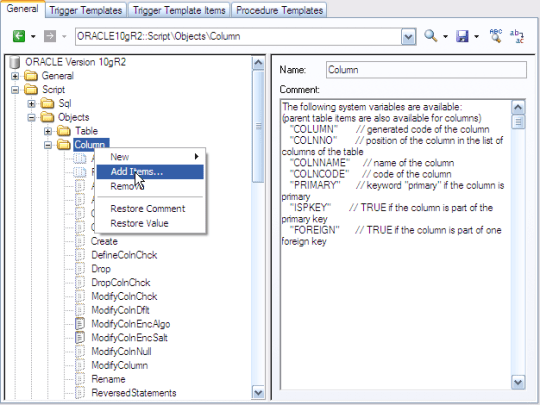
Scroll through the list of options that we apparently don’t need to know about and find AltEnableTSCopy.

Add it to the list of options, and then change the default from 0 (skip timestamp columns) to 1 (copy timestamp columns). You should now see your timestamp columns included in your insert statements.
I think this behavior is really poorly thought out.
- The default should be to include all columns in the insert statement rather than omitting them
- If you’re going to have the default be to omit columns from an insert statement, the parameter to configure this should really be visible without having to go in and manually add it.
I did take a few minutes to peak at the rest of the hidden options in the column and table objects in the XDB file and some of them appear quite useful. I hope to complete a more thorough review in the future. If I find anything interesting, I hope to post it here.
 Power Designing